
A 5G icon does not guarantee that a phone is getting the fastest or most reliable connection available at that moment. With 5G Smartphone Network Optimization, we can check the phone and local conditions before changing settings. The right choice depends on the device, location, and carrier.
This guide focuses on phone-level steps that can improve speed, reliability, and battery life. Better connectivity can make everyday tasks feel smoother, from sending data to joining a video call. We will look at practical checks that help us judge performance without expecting every network mode to work the same way everywhere.
Key Takeaways
- Check the connection where you need service.
- Compare results with the same phone and task.
- Change one setting at a time.
- Use Wi-Fi Calling for supported indoor voice calls.
- Choose a phone based on networks available today.
Start by checking what your phone actually connects to, not by assuming that every 5G connection behaves the same way.
What Does 5G Smartphone Network Optimization Change on a Phone?
Phone-level optimization improves how a device uses the connection available to it, while the carrier controls the network itself. We can adjust settings and habits to support a better experience, but those choices cannot add network capacity.
5G is the fifth generation of cellular technology. Latency is the delay between sending a data request and receiving a response, measured in milliseconds. The term “G5 network” is usually a mistaken way to write 5G, not a separate generation.
What the phone can and cannot optimize
Our phone can choose a network mode, manage app activity, and apply battery settings. Those choices may affect performance for a particular task. The carrier, by contrast, manages the capacity and congestion of its network.
A phone can make better use of an available connection, but it cannot fix a network with too little capacity.
That limit matters when a phone slows down during a busy event or in a place with weak service. A settings change may help the device, but it cannot control conditions beyond the handset.
What 5G is built to support
5G technology is the current generation of cellular service. Its three common service classes cover different use cases: enhanced mobile broadband (eMBB), massive machine-type communications (mMTC), and ultra-reliable low-latency communications (URLLC).
eMBB supports high data rates for tasks like streaming video. mMTC supports many connected devices, such as sensors. URLLC aims for highly dependable service with low latency, which can support tasks that need fast responses.
For beginners, these 5G notes are useful: speed depends on the network and setting, responsiveness relates to latency, coverage changes by place, and device compatibility matters. The Ericsson overview of 5G describes the technology’s wider capabilities, including connected devices and industrial uses.
Treat 5G as one connection option rather than a guarantee of better service in every place.
How Can You Tell Whether 5G Is Actually Faster?
A speed test is useful when we compare like with like, such as the same phone and location at different times. Download speed measures how quickly we receive content, while upload speed measures how quickly we send it.
Latency measures the delay in a response, so lower latency can make interactive tasks feel quicker. A national result describes many tests, not the service at our address. Speedtest results change with location, time, and network load.
| Measure | T-Mobile 5G | T-Mobile all mobile technologies |
|---|---|---|
| Median download | 314.38 Mbps | 275.55 Mbps |
| Median upload | 14.06 Mbps | 13.04 Mbps |
| Latency | 43 ms | 45 ms |
| Sample threshold | 25 Mbps down and 3 Mbps up met or exceeded in 79.3% of cases | 5 Mbps down and 1 Mbps up met or exceeded in 89.7% of cases |
In the United States from January through June 2026, T-Mobile’s median 5G download speed was 314.38 Mbps. Verizon’s median 5G download speed was 218.95 Mbps during the same period.
The measures tell different parts of the story. T-Mobile’s median 5G upload speed was 14.06 Mbps, and its latency was 43 ms. Its 5G samples met or exceeded 25 Mbps down and 3 Mbps up in 79.3% of cases.
Availability adds another view: T-Mobile users accessed its 5G network a majority of the time in 92.6% of cases. Its Speedtest 5G Connectivity Score was 73.52, compared with a Speedtest Connectivity Score of 80.12 across all mobile technologies. These are broad results, not a promise for one spot.
In the same period, T-Mobile’s median mobile download and upload speeds were 275.55 Mbps and 13.04 Mbps. Its mobile samples met or exceeded 5 Mbps down and 1 Mbps up in 89.7% of cases. The January-through-June 2026 Speedtest results also report a 45 ms median latency across mobile technologies.
Repeat a test in the place where the connection matters, because a national median cannot predict one room or one commute.
Which 5G Bands and Coverage Fit Your Location?
The useful first check is whether the phone supports the carrier’s local frequency bands and cellular technology. Band support matters because carriers use different radio frequencies in different places.
A phone needs support for both the frequency band and the network technology, such as 5G or 4G LTE. A supported band alone is not enough if the phone cannot connect using the local technology.
| Network layer | Bands and frequencies | Practical role |
|---|---|---|
| Extended Range | n71, 600 MHz | Lower-frequency coverage layer |
| Ultra Capacity mid-band | n2/n25, 1900 MHz; n41, 2.5 GHz | Mid-band capacity |
| Ultra Capacity mmWave | n258, 24 GHz; n260, 39 GHz; n261, 28 GHz | High-frequency capacity |
T-Mobile 5G Extended Range uses n71 at 600 MHz. Its Ultra Capacity service uses n2/n25 at 1900 MHz and n41 at 2.5 GHz. Ultra Capacity can use mid-band and/or mmWave spectrum.
The mmWave bands in T-Mobile Ultra Capacity are n258 at 24 GHz, n260 at 39 GHz, and n261 at 28 GHz. These network layers use different frequencies, so their coverage can differ across a city, building, or route.
Coverage scores also describe broad areas, not every address. Verizon’s U.S. Coverage Score was 30.4% in the first half of 2026. That national score does not promise reception inside a home or at a specific workplace.
Our best check is the exact model number, not just the phone’s brand or product family. Models sold in different regions can support different wireless technologies and bands, even when their names look alike.
Confirm the exact phone model’s supported bands before treating a coverage map as a guarantee.
Which Phone Settings Help Most on 5G?
If 5G keeps dropping or feels slower than LTE, compare the phone’s automatic 5G mode with LTE in the same location. A same-place test helps us judge whether a setting changes the task we care about.
5G Auto lets the phone use 5G when conditions support it, while LTE can be a practical test when 5G is weak or unstable. LTE is 4G cellular technology, so choosing it can reduce access to 5G-only performance where that matters.
Find the network mode controls
Look in the phone’s cellular or mobile-network settings for network mode controls. Android and iPhone use different menu names and paths, and labels can change with software updates.
We should check the manufacturer’s current instructions for the exact menu path on our model. A setting may sit under a different label, such as “Cellular Data Options” or “Preferred network type.”
Choose between 5G Auto and LTE
5G Auto allows the phone to connect to 5G when conditions support it. LTE offers a useful comparison when 5G service is inconsistent, though it cannot deliver 5G-only performance.
- Note the current network mode before changing anything.
- Change only one option at a time.
- Compare performance in the same place using the same task.
Menu labels vary by device and software version, so an instruction written for another phone may not match ours. A call, file download, or video stream can give a more useful comparison than watching the status icon alone.
Restore the original setting if the alternative does not improve the task you care about.
How Can You Improve Weak Indoor or Moving Signal?
Moving a few feet toward a window or outdoors can reveal whether a weak result is tied to the building. Signal strength can change across a room when walls or other materials block radio access.
A location change can help when a building blocks the phone, but it cannot create coverage where the carrier has none. We can test reception without assuming that one strong spot represents the whole building.
- Compare reception near a window with reception deeper inside.
- Test outdoors at the same location.
- Move away from dense building materials or large metal surfaces.
- Repeat a stationary test before judging a moving connection.
These checks help us separate an indoor blockage from a broader coverage limit. A stable outdoor result and a weak indoor result point to different conditions than poor results in both places.
Travel adds another variable: a moving phone changes cells and local conditions along the route. A result from a car or train cannot stand in for a stationary test at the destination.
Wi-Fi Calling can carry voice calls over Wi-Fi when both the phone and carrier support it. It can help with indoor voice coverage, but it does not raise cellular data speed.
Use Wi-Fi Calling for voice coverage at home when both the phone and carrier support it.
What 5G Changes Can Drain Battery?
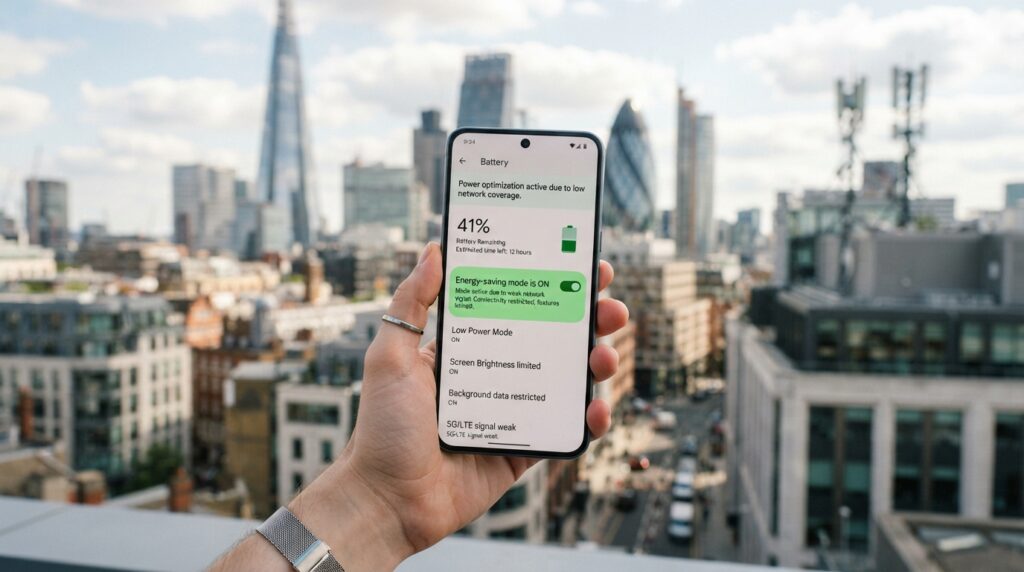
If battery life falls mainly in a weak-coverage area, the phone may be spending extra effort maintaining a usable connection. Reception conditions can affect energy use, especially when the phone keeps searching for service.
5G does not drain more power in every situation. Battery demand can rise when reception is weak or the phone repeatedly searches for a connection, but a strong connection may behave differently.
- Check which apps use the most battery.
- Reduce screen brightness when the setting is higher than needed.
- Shorten the screen timeout so the display turns off sooner.
- Limit background activity for apps that do not need it.
Screen use often deserves attention because the display stays active during reading, video, and navigation. We can lower brightness for indoor use without changing the cellular connection.
Background apps may also use energy when we are not looking at the screen. Restricting activity for apps that do not need fresh updates can reduce unnecessary work.
Android Adaptive Battery and iPhone Low Power Mode are built-in battery-management features. Their behavior depends on the phone and its software, so we can use them as tools rather than assume they affect every app alike.
Consumer Reports’ phone battery tips include reducing brightness, shortening screen timeout, and limiting background activity.
Change one battery setting at a time so we can tell which adjustment actually helps.
How Do You Diagnose Slow or Unstable 5G?
First establish whether the slowdown follows the phone or stays tied to one location. Comparable tests help us narrow the cause without changing several settings at once.
A single poor result is not enough to identify congestion. Ookla Speedtest can measure download speed, upload speed, and latency, but we should repeat tests under similar conditions.
Separate local signal from wider congestion
Use the same phone to test at another nearby location, then test again at a later time. If one place stays slow while a nearby spot works better, the difference may be local.
A slowdown that appears across locations at one time could involve broader network load, but one test cannot prove that. We should compare similar tasks and keep the phone and test method consistent.
Wi-Fi and cellular data are separate connection paths. If Wi-Fi works faster, that can show the app and phone handle the task, but it does not prove the cellular network is faulty.
Refresh the connection before changing more settings
Restart the phone or switch airplane mode on, then off, to refresh the connection. Repeat the test afterward, using the same app and location where possible.
If the whole phone feels slow, the cause may extend beyond cellular service. Our phone performance troubleshooting steps can help separate delays across the device from delays limited to internet tasks.
Keep a short record of the place, time, and result for each test. That makes patterns easier to spot than relying on a single status icon or a brief delay.
If the same problem persists in several locations and at different times, contact the carrier with the test results and the affected locations.
When Is a Different Carrier or Plan Worth Considering?
A plan change is worth investigating when repeated tests show a coverage problem or the current data allowance does not fit how the phone is used. Local service matters more than a low monthly price by itself.
A cheaper plan is not an improvement if its coverage or included data does not suit our use. Compare the service where we spend time and the data we actually need.
| Plan | Monthly price | High-speed data | Key condition |
|---|---|---|---|
| Verizon Simplicity | $30 | Not specified | Bring a phone line from another provider |
| US Mobile Unlimited Flex | $18 | 10GB, then unlimited at slower speeds | High-speed limit applies |
| Xfinity Mobile Select | $30 | 50GB of high-speed 5G data | 50GB high-speed allowance |
| T-Mobile Essentials 2.0 | $60 | 50GB of high-speed U.S. data | U.S. data allowance |
| Verizon Unlimited Welcome | $65 | Not specified | No hotspot data |
Plan details affect the value of each price. US Mobile Unlimited Flex costs $18 per month and includes 10GB of high-speed data, followed by unlimited data at slower speeds.
Verizon Simplicity costs $30 per month for one line when a customer brings a phone line from another provider. Xfinity Mobile Select costs $30 per month and includes 50GB of high-speed 5G data.
T-Mobile Essentials 2.0 costs $60 per month and includes 50GB of high-speed U.S. data. Verizon Unlimited Welcome costs $65 per month and does not include hotspot data.
Before switching, we should weigh the plan’s included data against video use, travel, and hotspot needs. A plan with less high-speed data may suit light use but frustrate someone who streams or shares a connection often.
Check the current plan terms and local coverage before switching, especially if the phone depends on hotspot data.

What Can Carriers Optimize Beyond Your Phone?
A smartphone can choose among available connection options, while network operators manage capacity and traffic across their infrastructure. Carrier-side optimization changes how networks handle many users and applications at once.
Phone owners cannot turn on carrier traffic systems from a handset. Network optimization can include application-aware routing, traffic shaping, quality-of-service (QoS) rules, load balancing, and multi-link aggregation.
How networks manage traffic and resources
Traffic prediction helps an operator estimate where demand may rise. Load balancing can shift users or data across available resources, while resource allocation assigns capacity where it is needed.
QoS policies give selected traffic a defined level of service. Traffic shaping can manage how data moves through a network, while application-aware routing can direct different applications along suitable paths.
Artificial intelligence and machine learning can help operators respond to changing conditions. For example, these tools can support traffic prediction and dynamic resource allocation, though they do not guarantee a faster connection at every location.
Why enterprise tools are different from phone settings
Enterprises use software-defined wide area networking, or SD-WAN, to manage traffic across wireless and wired WAN links. A WAN is a wide area network connecting sites over distance.
SD-WAN can apply policies across several links, such as wired service and wireless WAN. Multi-link aggregation can combine links for an organization’s network needs, rather than change a personal phone’s cellular connection.
These enterprise tools help businesses manage applications, cloud access, and operations across multiple sites. A phone owner may use the resulting service, but cannot configure the carrier’s network tools through ordinary handset settings.
Treat carrier-side optimization as an explanation of network behavior, not a setting to search for on the phone.
What Should Smartphone Users Know About 6G?
A 6G milestone on a standards schedule does not mean that a 6G network is ready for everyday phone service. 6G is a future cellular generation, not a setting a current smartphone can activate.
Release 21 milestones mark standards development, not a consumer launch date. 3GPP scheduled Release 21 5G-Advanced and 6G package approval and Stage-1 freeze for March 2027.
The schedule set the Release 21 Stage-2 freeze for June 2028 and Stage-3 freeze for December 2028. Its ASN.1/OpenAPI freeze was scheduled for March 2029.
A standards milestone does not tell us when a carrier will offer everyday 6G phone service.
Those dates describe steps in the standards process. They do not say when a phone will reach stores or when a carrier will offer 6G service to consumers.
For a buyer today, the 6G cellular technology future is a reason to follow industry progress, not a reason to delay a phone purchase. Current coverage and features determine what a phone can do now.
- Use the network options supported by the phone you own.
- Check current coverage before buying a new device.
- Avoid choosing a phone solely for a future network.
6G will refer to a future generation of cellular service. Until compatible phones and consumer networks exist, a 6G label on a schedule has no direct effect on current calls, data, or apps.
Choose a phone for the coverage and features available now, not for an unannounced 6G launch date.
Conclusion
Better 5G performance usually starts with finding out whether the problem is the phone, the place, or the plan. A same-location test gives us a useful baseline before we make a change.
One targeted adjustment is easier to judge than several changes made at once. We can check our phone’s supported bands and network settings, then choose a change that fits the problem we observed.
That simple approach protects time and helps us keep a setting that works. Run one test where service matters most, make one relevant adjustment, and compare again.