A phone can have a fast processor and still feel sluggish when opening apps or moving large files. Storage speed is one part of that experience, alongside the processor, memory, and software. Sequential throughput means the amount of data a storage device reads or writes continuously per unit of time.
A higher benchmark score does not guarantee that every app will feel faster. A test may measure large file transfers, while daily use can involve many smaller requests. We can use the right test to compare phones more fairly and make a better choice about storage space.
Key Takeaways
- Storage speed can affect app launches, updates, and file transfers.
- Sequential throughput and random I/O measure different kinds of work.
- Phone storage standards and benchmark results are not direct substitutes.
- Capacity tells us how much data fits, not how fast it loads.
- Our files, apps, and offline habits should guide capacity choices.
How does phone storage affect everyday performance?
Yes, phone storage affects performance most when the system is reading or writing data, but it is not the only factor. App launches, system updates, and large file transfers can all involve storage work. How much we notice depends on the task and the rest of the phone.
Capacity describes how much data fits; speed describes how quickly the phone can access that data. Android apps read code and data from storage during launch. The CPU, available RAM, GPU, and software also shape how quickly an app appears ready.
A slow app launch can involve storage, but it does not by itself prove that storage is the bottleneck.
RAM holds information that active apps need quickly, while the CPU handles instructions and the GPU draws images. If memory is tight, the phone may close an app and reload it later. A heavy app can also take time to start because of its design, even on fast storage.
Updates may read existing files and write new ones, so storage speed can affect part of the process. Large transfers also depend on the source, destination, cable, wireless link, and phone software. Those limits can hide the storage device’s own speed.
A phone’s overall performance comes from parts working together, not from one number. We should look at the task that feels slow and consider what else the phone is doing at that moment. A storage benchmark alone cannot explain every delay.
How do Smartphone Storage Performance tests work?
A storage speed test is useful only when we know what kind of work it measures. Different tests answer different questions about how the phone reads or writes data. A chart that mixes them can make a quick device look better for the wrong task.
Sequential throughput is reported in megabytes per second, or MB/s. It describes a continuous read or write, such as moving one large video file. Random I/O measures small requests across different locations, often with IOPS or latency.
| Test | Read or write operation | Reported measure | Representative task |
|---|---|---|---|
| Sequential read | Read a continuous block | MB/s | Opening a large video file |
| Sequential write | Write a continuous block | MB/s | Saving a large video file |
| Random read | Read small scattered requests | IOPS or latency | Loading app files in many locations |
| Random write | Write small scattered requests | IOPS or latency | Saving small app changes |
MB/s tells us how much continuous data moves in a given time. IOPS counts small input and output operations per second, while latency describes how long a request takes. A high sequential score cannot answer how quickly scattered requests finish.
Smartphone Storage Performance tests can also vary by app, test size, and phone condition. A useful smartphone storage performance chart labels each result as a read or write and keeps test methods alike. A result from one test app may not match another app’s result.
For a fair comparison, we can follow four basic steps:
- Use the same test app and test size.
- Run the test on the phone rather than comparing unlike devices.
- Repeat the test under similar conditions.
- Note whether the result measures a read or a write.
Repeated results can reveal whether a score holds steady or changes from run to run. They still describe one workload, not every part of smartphone performance. Compare like-for-like results, since a sequential read score cannot stand in for random-write behavior.
UFS, eMMC, and NVMe: which storage is faster?
Among the listed smartphone storage standards, UFS 4.0 has higher stated sequential bandwidth than UFS 3.0 or UFS 3.1. NVMe Gen5 has a higher stated sequential bandwidth than either phone-focused option listed here. The figures describe standards, not guaranteed phone results.
UFS 4.0 is the strongest current-generation comparison among the listed phone-focused standards. UFS 3.0 and UFS 3.1 arrived from 2018 to 2020, while UFS 4.0 was introduced in 2022. UFS 5.0 was published in 2026.
| Storage standard | Approximate sequential bandwidth | What the comparison tells us |
|---|---|---|
| UFS 3.0/3.1 | 2,100 MB/s read; 1,200 MB/s write | Earlier UFS read and write rates |
| UFS 4.0 | 4,200 MB/s read; 2,800 MB/s write | Higher stated phone-focused bandwidth |
| NVMe Gen5 | About 14 GB/s | Higher bandwidth, but not a like-for-like phone option |
UFS 4.0 uses HS-G5 M-PHY and offers about 4,200 MB/s in sequential reads. Its sequential writes reach about 2,800 MB/s. Its stated sequential bandwidth is about 4,200 MB/s, compared with about 14 GB/s for NVMe Gen5.
UFS handles reads and writes in parallel
UFS uses a serial differential M-PHY interface and the SCSI command set. It supports full-duplex operation, which means it can read and write at the same time. Native command queuing helps it manage several requests.
eMMC uses a parallel 8-bit MMC bus and half-duplex operation. It handles reads or writes in turn rather than at the same time. This difference helps explain why UFS is a common performance point in smartphone hardware comparisons.
Soldered storage and removable cards serve different roles
UFS in a phone is embedded flash storage in a soldered chip package, not removable storage. A microSD card can provide extra room on phones with a card slot, but it serves a different role. Its test results should not be treated as a direct match for internal storage.
UFS 5.0 is expected to provide about 10 GB/s of sequential bandwidth. Its expected standard-level bandwidth is not a promise about every phone’s real-world speed. A fast removable card can add space, but it does not turn a phone’s soldered UFS storage into removable storage.
What do speed results mean for app launches and file transfers?
A large file copy and an app launch can produce very different impressions of the same phone’s storage. The task matters because sequential speed best reflects large, continuous transfers. App behavior can involve smaller requests and other parts of the phone.
A fast sequential result is most relevant when we move large files. Copying a large video chiefly exercises sequential reads and writes. Opening an app with saved data can involve many smaller, less orderly requests.
Installing an update can read existing app files and write changed files. The time can also depend on download speed, the processor, available RAM, the operating system, and app design. A high score does not mean every update or app will finish sooner.
When we judge a real task, we can notice three things:
- Whether the task is mostly a large transfer.
- Whether it involves many small requests.
- Whether the phone is doing other work at the same time.
These details help connect a benchmark to an actual experience. A video copy may show a clear difference between storage devices, while app startup can be shaped by several parts at once. Background downloads or open apps can also change the phone’s response.
We can compare the same task across phones rather than treating one result as a full measure of performance. That makes a test easier to use when deciding which device fits our routine. Use the task you care about most as the reference point for judging a test result.
What happens when phone storage is full?
A phone can still show low available storage after a deletion because Trash folders and app data may retain files. Local space can hold photos, videos, downloads, offline media, and app files. Removing one item does not always remove every copy or saved setting.
A 128GB phone has less than 128GB available for our own files. The operating system and preinstalled content use part of the advertised capacity. The exact free space varies by phone model and installed software.
Photos, downloads, and app files use local space
Downloads and offline music or video can take up space even when we rarely open them. App files can include saved content, while photos and videos often grow into large collections. Android’s storage settings can show which kinds of files use the most space.
Google’s Android storage help covers ways to check storage use and free space. It includes options such as removing downloads and media, uninstalling unused apps, and archiving apps. These actions affect local storage, not the phone’s storage speed.
Trash can keep deleted items in storage
On Samsung Galaxy devices, deleted photos and videos in Gallery remain in Trash until we empty that folder. Google Drive files in Trash also continue to use Google Account storage until we empty Drive’s Trash. Deleted does not always mean erased right away.
Checking both places can explain why storage numbers do not change after a deletion. We should make sure we no longer need a file before emptying a Trash folder. Once removed from Trash, the file may no longer be easy to restore.
Cache, app data, and SD-card moves are different
On Samsung Galaxy devices, clearing an app’s cache removes temporary files. Clearing app data resets the app to factory defaults and can remove saved settings and files. Samsung’s cache and app-data settings distinguish these actions.
Samsung’s Device care Memory tool can free memory and stop background apps from slowing a Galaxy device. It addresses memory, not storage space. Many Android apps cannot move to a microSD card, and Samsung shows a Change option only when an app can move.
A microSD card also does not make every app or file portable. The app’s own settings determine whether the phone can move it. Before clearing app data, confirm that anything important in the app has been backed up.
How much phone storage capacity do we need?
The right phone capacity depends mainly on how much we keep locally and how often we move files elsewhere. For light use, 128GB can work for people who stream, use few large apps, and regularly offload files. The best fit changes with our offline habits.
256GB gives more room for offline media, games, and photos than 128GB. It can suit people who keep more files on the phone. A 512GB model is a reasonable choice for large video libraries or many large files.
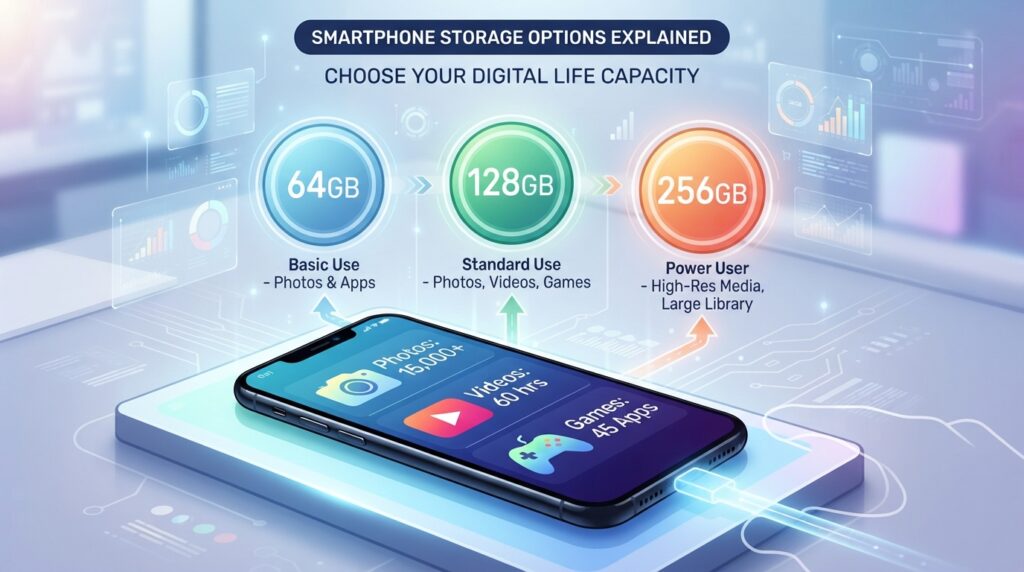
These are use-case guidelines, not guarantees. A person who records lots of video may fill 256GB sooner than someone who mostly streams. App size, photo habits, and how often we move files all shape the space we need.
Cloud storage can keep backups and files available across devices, but it does not add physical capacity to a phone. A standard Google Account includes up to 15GB shared across Google Drive, Gmail, and Google Photos. That shared 15GB limit covers all three services together.
Google One Basic provides 100GB for $1.99 per month and can be shared with up to five others. Google AI Plus provides 2TB for $9.99 per month, and Google AI Pro provides 5TB for $19.99 per month. Both can also be shared with up to five others.
Cloud space helps when we have a steady connection and want files on more than one device. Local capacity still matters for downloaded shows, games, and files we need without internet access. Choose more local capacity when reliable offline access matters more than relying on a cloud connection.
How does storage compare with RAM, CPU, and GPU?
RAM and storage do different jobs, so adding capacity to one does not automatically speed up the other. RAM supports active apps and multitasking, while internal storage keeps installed apps and files. Each part affects a different kind of work.
RAM holds active app data for quick access; storage keeps data when apps are closed. A phone needs both. More storage does not replace memory for open apps, and more RAM does not create extra room for photos.
RAM holds active app data while storage keeps files
RAM gives the system a place to keep information that active apps use. When RAM is limited, the phone may close an app in the background. Returning to it can then trigger a reload, even when storage speed is high.
Internal storage keeps apps and files after the phone closes them. It also holds app data, which can include saved settings and files. The difference between RAM and storage helps us identify whether a problem involves active use or saved content.
CPU, GPU, and software shape the rest of the experience
The CPU runs instructions and handles many general tasks. The GPU renders images and supports graphics in games and video. A game can feel slow because of graphics work even when storage access is quick.
The operating system and app software affect how well the hardware works together. Connectivity also matters when a task depends on a download or online service. Those limits can make a phone feel slow without pointing to storage as the cause.
A device’s hardware, software, and operating system all shape its response. We can look for patterns: one app may be poorly designed, while delays across many tasks may point to a broader system limit. A phone slowdown troubleshooting guide can help separate storage from memory and other causes.
Check which resource is constrained before blaming storage for every slowdown.
What makes storage performance feel consistent over time?
Consistent performance is best judged during the tasks we repeat, not from one peak score. Longer use can reveal limits that a short benchmark does not show. Heat, power management, software, and battery condition can all affect sustained phone performance.
A single benchmark run measures one workload, not every phone task. Thermal management can reduce speed as a phone warms up. Power management and battery condition can also change how the device behaves during longer use.
For a fair comparison, test the same task more than once and keep the phone’s workload conditions similar.
Software updates can change how the system handles background work and apps. A phone may also perform differently when it is downloading files or backing up photos. These conditions matter when we compare results over time.
We can check sustained performance with a few simple steps:
- Compare repeated runs under similar conditions.
- Try a sustained file-transfer or app workload.
- Note whether the phone is warm or handling background tasks.
- Leave room for future files and updates.
Capacity choice affects how much we can keep on the device, not the result of every speed test. 256GB is a practical step up for people who regularly keep more apps and media locally. 512GB suits larger offline libraries and video collections, while 128GB can remain adequate for lighter use with regular offloading.
A phone that handles our usual work without large slowdowns may serve us better than one with a higher peak score. Repeated tasks offer a more useful view of stability than a single run. For a fair comparison, test the same task more than once and keep the phone’s workload conditions similar.
Conclusion
A storage speed number is useful when we connect it to a real task. A test that resembles our daily use gives us a clearer way to compare phones. Capacity should reflect how many apps, photos, videos, and offline files we keep on the device.
Our next step is simple: identify one task that feels slow, then compare phones using a test that matches that task. That keeps a benchmark tied to a real need instead of treating the biggest score as the winner.
Before choosing a phone, decide which matters more for our routine: faster access to data, more room for it, or both.